A Decision Tree is a flowchart-like structure that recursively splits data based on feature values. Each split creates decision boundaries that are parallel to the feature axes, which makes decision trees highly interpretable. Below, we explore how a decision tree models the given dataset.
| Outlook | Temp. | Humidity | Windy | Play Golf |
|---|---|---|---|---|
| Rainy | Hot | High | False | No |
| Rainy | Hot | High | True | No |
| Overcast | Hot | High | False | Yes |
| Sunny | Mild | High | False | Yes |
| Sunny | Cool | Normal | False | Yes |
| Sunny | Cool | Normal | True | No |
| Overcast | Cool | Normal | True | Yes |
| Rainy | Mild | High | False | No |
| Rainy | Cool | Normal | False | Yes |
| Sunny | Mild | Normal | False | Yes |
| Rainy | Mild | Normal | True | Yes |
| Overcast | Mild | High | True | Yes |
| Overcast | Hot | Normal | False | Yes |
| Sunny | Mild | High | True | No |
This dataset contains four predictor variables (Outlook, Temperature, Humidity, and Windy) and a target variable (Play Golf?), which the decision tree uses to classify whether playing golf is feasible or not.
If we visualize a 2D feature space with Outlook on the x-axis and Humidity on the y-axis:
This makes Decision Trees intuitive and interpretable, but they may struggle when dealing with complex, non-rectangular patterns in data. Would you like a visual example of the decision regions? 🚀
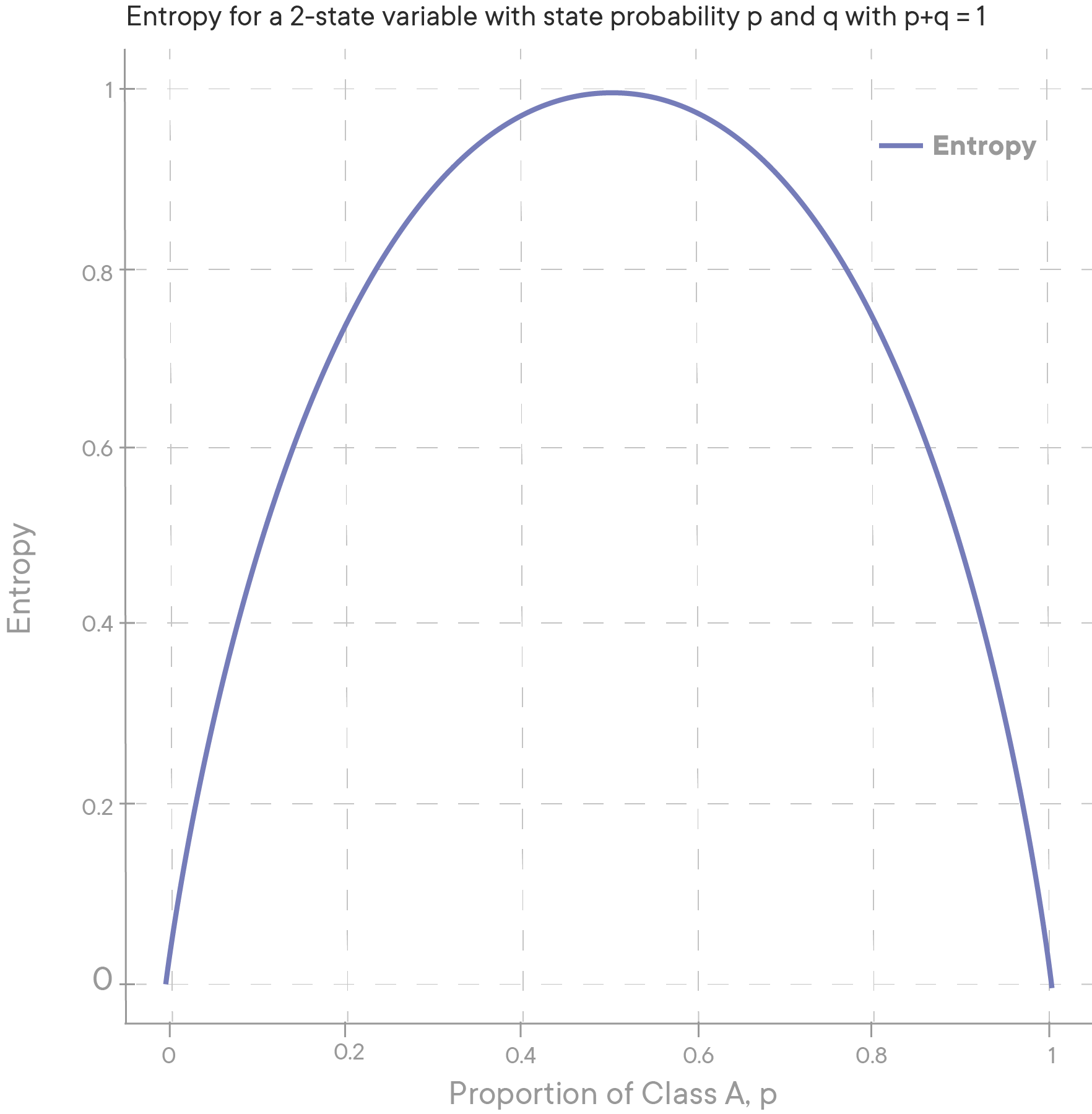
| Output | P(H) | P(T) | Entropy | Interpretation |
|---|---|---|---|---|
| {H, H, T, T} | 50% | 50% | 1 | Output is a random event |
| {T, T, T, H} | 25% | 75% | 0.8113 | The result is less random i.e., biased coin |
H(y) = - Σ P(yi) logb (P(yi))
P(yi) = P(Y = yi)
typ. b = 2 (log) or b = e (ln)
H(y) = -P(y = yes) log (P(y = yes)) - P(y = no) log (P(y = no))
H(y) = - (9/14) log (9/14) - (5/14) log (5/14) = 0.94
| Sr. No. | P(Y+) | P(Y-) | Entropy |
|---|---|---|---|
| 1 | 99% | 1% | 0.08 |
| 2 | 50% | 50% | 1.00 |
| 3 | 100% | 0% | 0.00 |
If both classes are equally probable, we have a maximum entropy value of 1.
If one class fully dominates, the entropy value becomes 0.

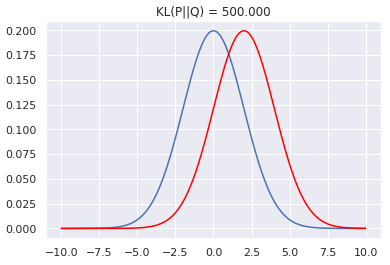
\( D_{KL}(P || Q) = \sum_{x \in X} p(x) \log \frac{p(x)}{q(x)} \)
\( D_{KL}(P || Q) = \int_{-\infty}^{\infty} p(x) \log \frac{p(x)}{q(x)} \,dx \)
p(x) and q(x) are probability densities of P & Q
The information gain is based on the decrease in entropy after a dataset is split on an attribute. Constructing a decision tree is all about finding the attribute that returns the highest information gain (i.e., the most homogeneous branches).
Example:
\[ H(y) = -P(y = \text{yes}) \log P(y = \text{yes}) - P(y = \text{no}) \log P(y = \text{no}) \]
\[ H(y) = - \left( \frac{9}{14} \log \frac{9}{14} + \frac{5}{14} \log \frac{5}{14} \right) = 0.94 \]
The dataset is then split on the different attributes. The entropy for each branch is calculated. Then it is added proportionally to get total entropy for the split. The resulting entropy is subtracted from the entropy before the split. The result is the Information Gain, or decrease in entropy.
| Outlook | Yes | No | Entropy | W.E(Play, Outlook) |
|---|---|---|---|---|
| Sunny | 3 | 2 | 0.9710 | 0.3468 |
| Overcast | 4 | 0 | 0.0000 | 0.0000 |
| Rainy | 3 | 2 | 0.9710 | 0.3468 |
| Gain | 0.246 | |||
| Humidity | Yes | No | Entropy | W.E(Play, Humidity) |
|---|---|---|---|---|
| High | 3 | 4 | 0.9852 | 0.4926 |
| Normal | 6 | 1 | 0.5917 | 0.2958 |
| Gain | 0.152 | |||
| Temp | Yes | No | Entropy | W.E(Play, Temp) |
|---|---|---|---|---|
| Hot | 2 | 2 | 1.0000 | 0.2857 |
| Mild | 4 | 2 | 0.9183 | 0.3936 |
| Cool | 3 | 1 | 0.8113 | 0.2318 |
| Gain | 0.029 | |||
| Windy | Yes | No | Entropy | W.E(Play, Windy) |
|---|---|---|---|---|
| FALSE | 6 | 2 | 0.8113 | 0.4636 |
| TRUE | 3 | 3 | 1.0000 | 0.4286 |
| Gain | 0.048 | |||
\[ \text{Gain}(T, X) = \text{Entropy}(T) - W.\text{Entropy}(T, X) \]
\[ G(\text{Play Golf}, \text{Outlook}) = \text{Entropy}(\text{Play Golf}) - W.\text{Entropy}(\text{Play Golf}, \text{Outlook}) \]
\[ 0.94 - 0.693 = 0.247 \]
\[ IG(y, D_i) = \sum_{i=1}^{n} \frac{|D_i|}{|D|} H_{D_i}(y) - H_D(y) \]
Entropy formula:
H(S) = - ∑ p(i) log₂ (p(i))
From the dataset:
H(S) = - (9/14 log₂ (9/14) + 5/14 log₂ (5/14))
H(S) = - (0.642 × -0.459 + 0.358 × -0.807) = 0.940
Splitting based on Outlook:
H(Outlook) = (5/14 × 0.970) + (4/14 × 0.000) + (5/14 × 0.970) = 0.693
IG(Outlook) = H(S) - H(Outlook) = 0.940 - 0.693 = 0.247
H(Humidity) = (7/14 × 0.985) + (7/14 × 0.592) = 0.788
IG(Humidity) = H(S) - H(Humidity) = 0.940 - 0.788 = 0.152
H(Wind) = (8/14 × 0.811) + (6/14 × 1.000) = 0.892
IG(Wind) = H(S) - H(Wind) = 0.940 - 0.892 = 0.048
Since Outlook has the highest IG, it becomes the root node.
Now, we divide the dataset based on Outlook:
All are Yes, so it's a leaf node.
Choices:
Since Humidity has the highest IG, we split on Humidity.
Humidity: 0.970
Splitting on Humidity.
R₁: IF (Outlook=Sunny) AND (Windy=FALSE) THEN Play=Yes
R₂: IF (Outlook=Sunny) AND (Windy=TRUE) THEN Play=No
R₃: IF (Outlook=Overcast) THEN Play=Yes
R₄: IF (Outlook=Rainy) AND (Humidity=High) THEN Play=No
R₅: IF (Outlook=Rainy) AND (Humidity=Normal) THEN Play=Yes
Outlook
// || \\
________// || \\_____________
| | |
Sunny Overcast Rainy
| | |
Windy Play=Yes Humidity
____|____ ____|____
| | | |
False True High Normal
Play=Yes Play=No Play=No Play=Yes
Gini Impurity is a metric used to measure how often a randomly chosen element from the set would be incorrectly classified if it were randomly labeled according to the class distribution in the subset.
It is used in decision trees, especially in algorithms like **CART (Classification and Regression Trees)**, to decide the best split at each node.
Formula:
\[ Gini(D) = 1 - \sum_{i=1}^{c} P_i^2 \]
Where:
Example:
\[ Gini = 1 - \left( \left(\frac{9}{14}\right)^2 + \left(\frac{5}{14}\right)^2 \right) \]
\[ Gini = 1 - \left(0.408 + 0.127\right) = 0.465 \]
The lower the Gini Impurity, the purer the dataset.
| Outlook | Yes | No | Gini | W.G(Play, Outlook) |
|---|---|---|---|---|
| Sunny | 3 | 2 | 0.48 | 0.171 |
| Overcast | 4 | 0 | 0.00 | 0.000 |
| Rainy | 3 | 2 | 0.48 | 0.171 |
| Gini Gain | 0.122 | |||
| Humidity | Yes | No | Gini | W.G(Play, Humidity) |
|---|---|---|---|---|
| High | 3 | 4 | 0.49 | 0.245 |
| Normal | 6 | 1 | 0.24 | 0.120 |
| Gini Gain | 0.100 | |||
| Temp | Yes | No | Gini | W.G(Play, Temp) |
|---|---|---|---|---|
| Hot | 2 | 2 | 0.50 | 0.143 |
| Mild | 4 | 2 | 0.44 | 0.189 |
| Cool | 3 | 1 | 0.38 | 0.136 |
| Gini Gain | 0.033 | |||
| Windy | Yes | No | Gini | W.G(Play, Windy) |
|---|---|---|---|---|
| FALSE | 6 | 2 | 0.38 | 0.218 |
| TRUE | 3 | 3 | 0.50 | 0.214 |
| Gini Gain | 0.033 | |||
\[ Gini\ Gain(T, X) = Gini(T) - W.Gini(T, X) \]
\[ Gini(\text{Play Golf}, \text{Outlook}) = Gini(\text{Play Golf}) - W.Gini(\text{Play Golf}, \text{Outlook}) \]
\[ 0.465 - 0.343 = 0.122 \]
| Criteria | Overfitting | Underfitting |
|---|---|---|
| Model Complexity | Too complex | Too simple |
| Training Accuracy | High | Low |
| Test Accuracy | Low (poor generalization) | Low (poor learning) |
| Solution | Pruning, limiting depth | Increase depth, reduce pruning |